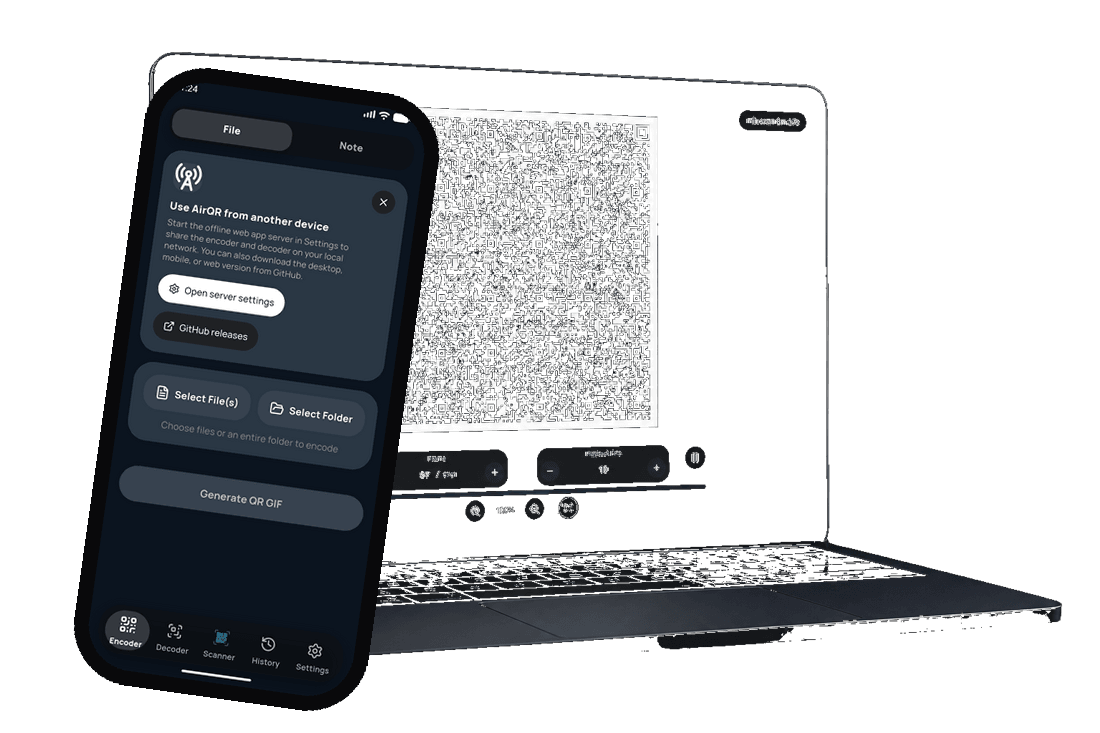
AirQR — Animated QR file transfer without a network

AirQR
Transfer files through animated QR codes with fountain codes and a smart benchmark
Demo · Get AirQR — all downloads · GitHub




TL;DR: AirQR transfers files via animated QR codes encoded with RaptorQ fountain codes. It runs in the browser (Rust compiled to WebAssembly) and on mobile (Flutter + Rust FFI). A built-in benchmark finds the best settings for your screen/camera pair. Reproducible throughput is around 8 KB/s on an iPhone 12 — the point is not speed, it is the lack of network, cable, and pairing. Inspired by divan's txqr project.
AirQR encodes a file into an animated QR GIF. The other device scans until it has enough unique packets, then rebuilds the original. Missing or corrupted frames are tolerated: it does not matter which packets arrive, only that enough of them do.
Contents
- How it started
- How to use it
- QR codes: capacity and limits
- Fountain codes: why they change everything
- Parallel encoding
- Multi-chunk streaming
- Cross-device resume
- The stack
- Finding the optimal settings
- Benchmark & results
How it started
I was looking for a way to transfer data with no network, no Internet, no Bluetooth, and no cable.
QR codes came to mind, but they hold at most 7,089 numeric characters, and ~3 KB of binary. First problem: I would have to scan several QR codes one by one, then reassemble the file — slow and tedious, especially for large files.
I built a first prototype encoded in base64, then found this article about transferring data through animated QR codes encoded as bytes.
That was exactly what I needed: encode data into QR frames, animate them, and let a camera scan them back. No network, no pairing, no permissions.
His project, txqr, reached about 9 KB/s under ideal conditions using Go, Gomobile, and GopherJS. A follow-up on fountain codes later brought 13 KB down to 500 ms — nearly 25 kbps.
What if you could scan with one phone and finish on another? What if the whole thing ran natively in the browser, with no Go backend and no install: one HTML file to encode and decode. With Flutter, several devices can also scan the same large file in parallel to speed up the capture.
That's how AirQR started.
How to use it
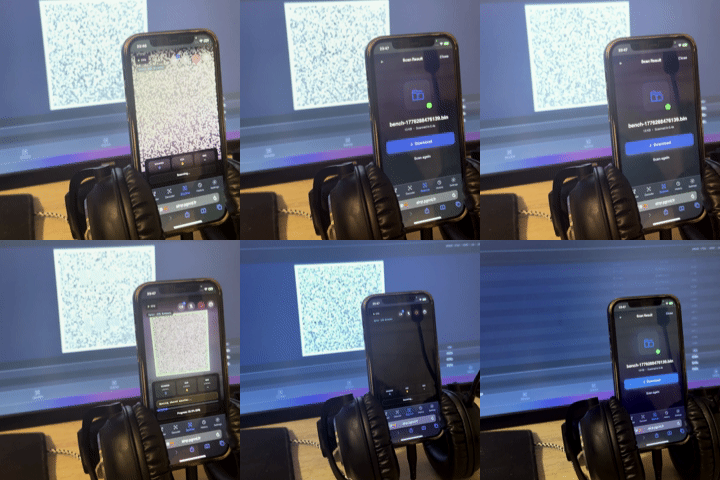
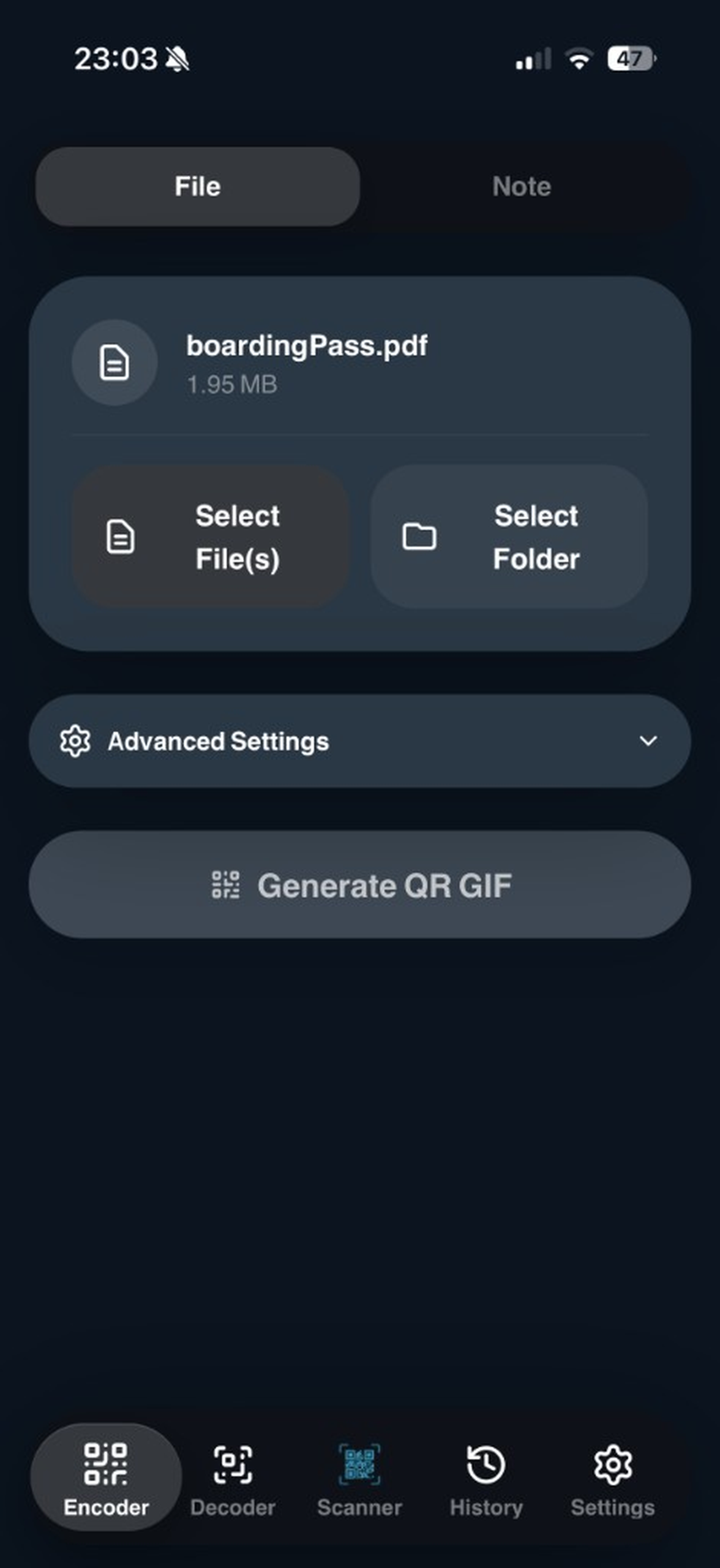 1. Pick | 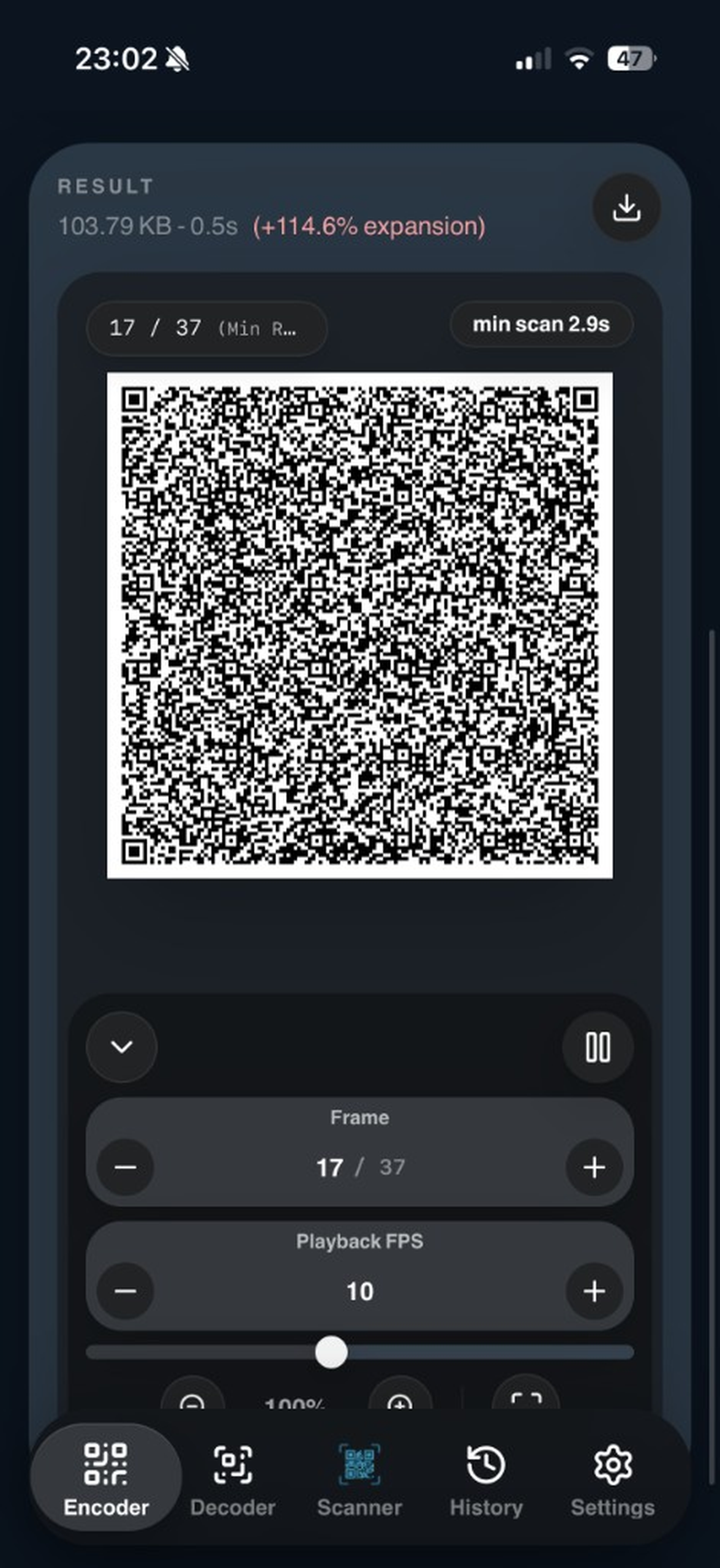 2. Encode | 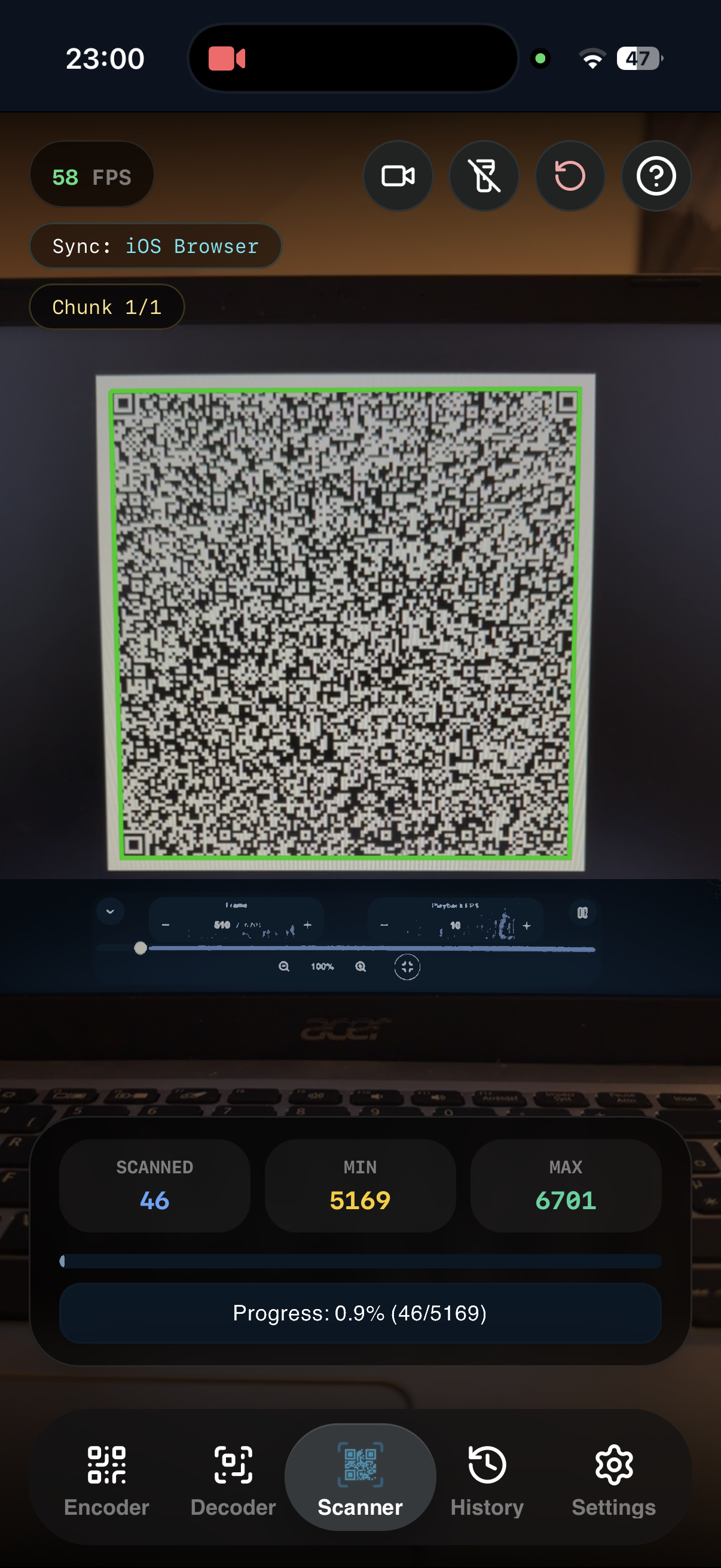 3. Scan |
- Pick a file in the web app, the mobile app, or the portable HTML.
- Encode: AirQR produces an animated QR GIF (RaptorQ fountain codes).
- Display the GIF fullscreen on the sending device.
- Scan with the other device until the progress bar fills. The original file is rebuilt locally.
No account, no upload, no required network. The sync server only comes in if you want resume across several scanners — it is optional.
QR codes: capacity and limits
A single QR code (version 40, the largest) can hold:
| ECC level | Binary capacity | Minus the 10-byte header |
|---|---|---|
| Low (7%) | 2,953 bytes | 2,943 bytes |
| Medium (15%) | 2,331 bytes | 2,321 bytes |
| Quartile (25%) | 1,663 bytes | 1,653 bytes |
| High (30%) | 1,273 bytes | 1,263 bytes |
That's ~3 KB max per frame. Enough for a URL, not for a file. The solution: animate them.
Show a sequence of QR codes fast enough that a camera can reconstruct the data from the captured frames.
The problem with naive splitting: if you miss even one frame out of 200, you are stuck waiting for the animation to loop back to that frame. Imagine that on a file with 13,000 frames...
This is where fountain codes come in.
Fountain codes: why they change everything
Divan explained this beautifully in his fountain codes article, which I recommend reading first.
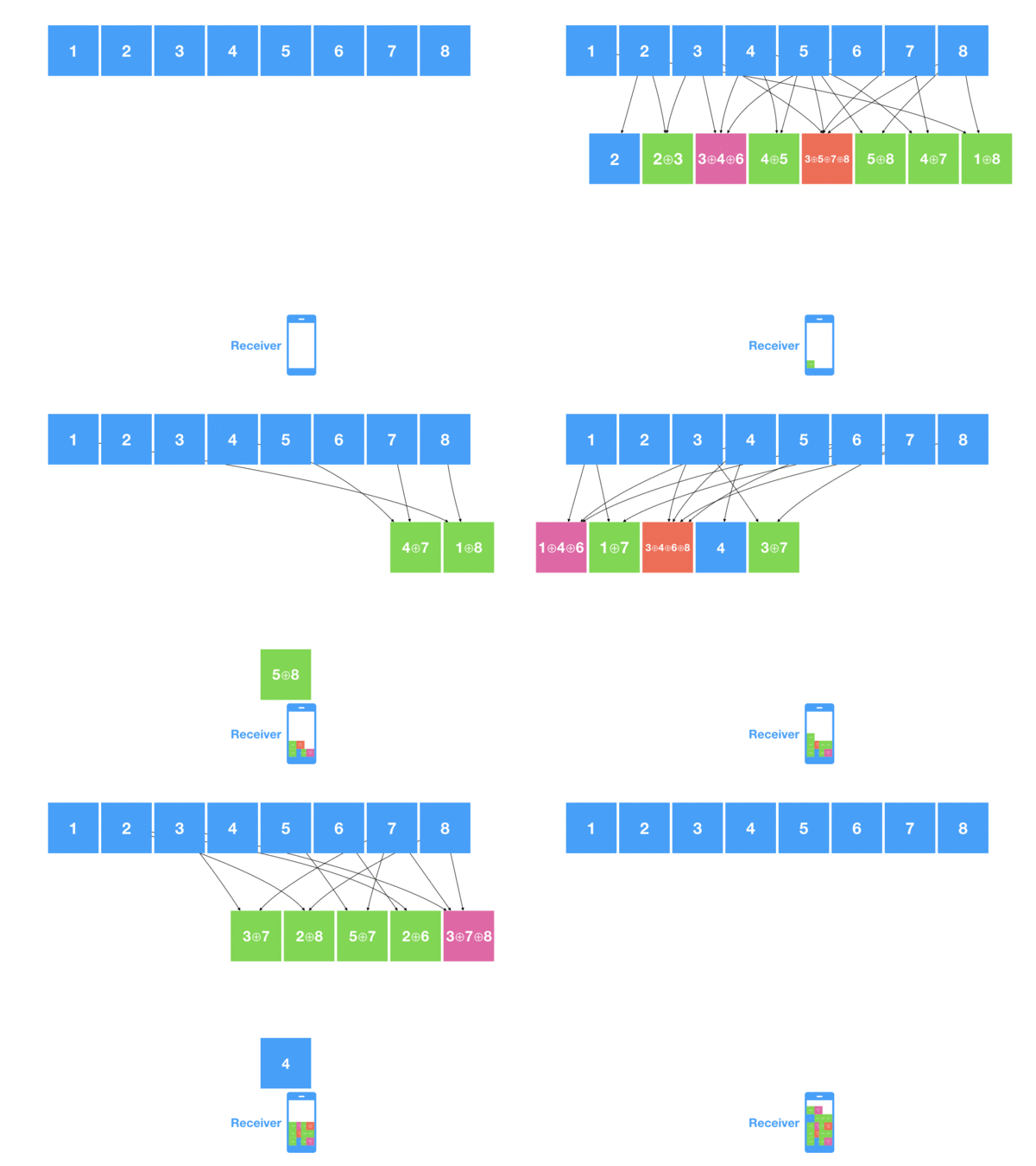
Fountain codes are rateless: the encoder can generate a potentially infinite stream of unique encoded packets from the original data. The decoder does not care which packets it receives, only that it gets enough of them.
Here is the idea, briefly.
The encoder:
- Splits the data into K source blocks
- For each encoded packet, XORs a random subset of source blocks (the subset size follows a Soliton distribution)
- Embeds the packet ID so the decoder knows which source blocks were combined
The decoder:
- Collects encoded packets
- When it finds a packet containing a single source block → decoded immediately
- When it finds a packet containing two XORed blocks, one of them already decoded → XOR recovers the other
- This cascades: each newly decoded block unlocks others
With a well-tuned distribution, you need about K × (1 + ε) packets to recover K source blocks, where ε is a modest overhead (I use 20%).
AirQR's implementation: RaptorQ
AirQR uses RaptorQ (via the Rust raptorq crate), the evolution of fountain codes. Unlike basic LT codes (which divan used via gofountain in Go), RaptorQ guarantees decoding with minimal overhead, typically less than 2% beyond the theoretical minimum.
Each packet is wrapped with a 10-byte header before becoming a QR frame:
┌──────────────┬──────────────┬──────────────┬─────────────┐
│ TotalSize    │ PacketSize   │ SymbolID     │ Payload     │
│ 4 bytes BE   │ 2 bytes BE   │ 4 bytes      │ variable    │
└──────────────┴──────────────┴──────────────┴─────────────┘
In practice, with 20% overhead, the encoder generates 1.2 × K packets. You need about K of them to reconstruct, so ~83% of the generated frames — not 83% of the source file, and packet order does not matter. The GIF loops forever: hold the camera steady until the bar fills. Missed frames on the first pass? The next loop brings new repair packets.
Shrinking GIFs: every byte counts
One thing became clear early: GIF size matters for performance. A lighter GIF means faster loading, less memory, and better compatibility.
2-color indexed palette
QR codes are black and white, not RGBA (4 bytes per pixel). AirQR renders frames into a 2-color indexed buffer, where 0 = white and 1 = black.
The savings are massive. For a 177×177 pixel QR frame (later scaled up on screen, stored at 177×177 to keep the file small):
- RGBA: 31,329 × 4 = 125,316 bytes per frame (raw)
- 2-color indexed buffer: 31,329 × 1 = 31,329 bytes per frame (raw)
- After GIF LZW compression: about 10,000–12,000 bytes per frame
That's about a 70% reduction in GIF size versus RGBA encoding.
Compression before encoding
Before the data even reaches the QR encoder, AirQR can compress it:
- Rust side: zstd level 3 (fast, streamed in 1 MB chunks for large files)
- Browser side: deflate level 6 (via fflate), but only if it saves ≥ 10%
The compression flag is stored in the first byte of the payload (0 = raw, 1 = zstd, 2 = deflate), so the decoder knows how to decompress.
Dynamic packet sizing
Smaller packets = smaller QR codes = easier to scan, but more frames. Larger packets = fewer frames, but denser QR codes that cameras struggle with.
For files over ~500 KB, AirQR automatically grows the packet size (capped, aligned to 4 bytes for RaptorQ) to target around 2,000 frames: short enough to stay scannable, dense enough not to explode the GIF.
Current limit: the GIF still weighs about 3× the useful payload (+200% expansion). The 2-color palette and LZW help, but each frame remains a full QR image. I have not been able to get lower than that yet.
Parallel encoding
QR generation is CPU-heavy. A single frame takes a few milliseconds, but 2,000 frames add up. AirQR parallelizes this differently per platform.
Rust (native / Flutter)
Rayon spreads packets across all CPU cores: each core encodes its batch of QR codes and renders the indexed buffer, then frames are assembled into the GIF.
Browser (Web Workers + SharedArrayBuffer)
Frames are handed to a worker pool. When SharedArrayBuffer is available, workers write straight into shared memory — zero copy. The main thread then assembles the GIF in order.
On a modern computer, encoding 2,000 frames takes a few seconds. On mobile, about 10 to 15 seconds.
Multi-chunk streaming
For large files, AirQR splits the data into chunks: rather than one GIF with 100,000 frames, you get e.g. 10 GIFs of 10,000, each with its own independent RaptorQ encoder.
┌──────────────────────────────────────────────────────────────────────────────┐
│ Streaming header                                                            │
├────────┬───────────┬─────────┬─────────────┬─────────────┬────────┬─────────┤
│ Mode   │ SessionID │ ChunkID │ TotalChunks │ ChunkOffset │ Total  │ Packet  │
│ 1 byte │ 4 bytes   │ 4 bytes │ 4 bytes     │ 8 bytes     │ 4 bytes│ 2 bytes │
├────────┴───────────┴─────────┴─────────────┴─────────────┴────────┴─────────┤
│ ExactPacketsTotal (4 bytes) | SymbolID (4 bytes) | variable payload         │
└──────────────────────────────────────────────────────────────────────────────┘
A missed packet from chunk 3 does not affect chunks 0, 1, or 2. Chunks can arrive out of order: the decoder keeps a HashMap<chunk_id, ChunkDecoder> and only assembles the file when every chunk is complete.
Cross-device resume (optional)
The simple case — one screen, one camera — needs no server.
If you want to start scanning on one phone and continue on another, an optional sync server persists received packets in SQLite. The new device queries the server, learns which packets are missing, and only scans the gaps. The WebSocket protocol tracks lastContiguous, missing ranges, and receivedCount.
The stack
| Layer | Technology |
|---|---|
| Encoding/decoding core | Rust (raptorq, qrcodegen, zstd, image, gif) |
| Web UI | TypeScript + React + Vite, WASM via wasm-pack |
| Mobile app | Flutter with Rust FFI (flutter_rust_bridge) |
| Sync server (optional) | Python (stdlib HTTP + websockets, SQLite) |
| QR scanning | Web: BarcodeDetector API / Mobile: mobile_scanner |
The Rust core compiles to native (Flutter) and WebAssembly (browser). Same code, same behavior, everywhere.
Finding the optimal settings
divan's benchmarks showed the best result at 11 FPS, 850-byte chunks, Medium ECC. Optimal settings are extremely specific to the screen/camera pair.
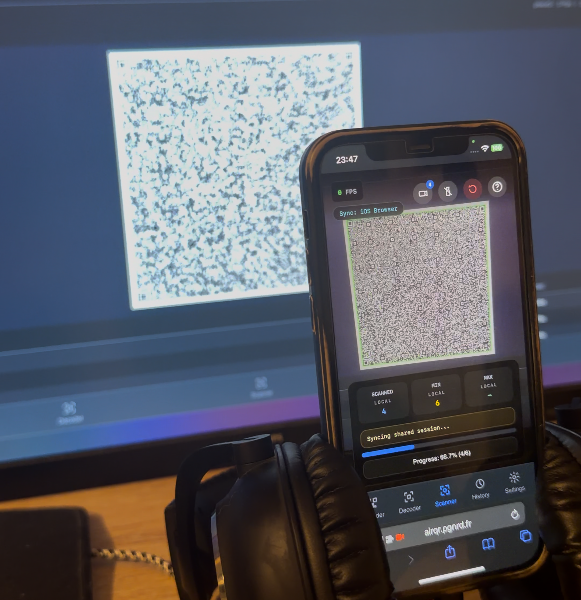
The parameter space is large:
- FPS: 1–30+
- Packet size: 100–2,800 bytes
- ECC level: Low, Medium, Quartile, High
- RaptorQ overhead: 1.0×–2.0×
- Compression: on / off
Smart Benchmark: two-phase adaptive optimization
The 13 KB test payload is generated once per session, to keep the comparison honest. The app runs two measurement waves, named phase 1 and phase 3. There is no user-facing phase 2: that name is leftover from the internal encoding pipeline (RaptorQ, then QR render), not a benchmark step.
Phase 1: broad sweep
Every combination of FPS × packet size × ECC level, about 130 configurations. For each:
- Encode a 13 KB test payload into a QR animation
- Display it on screen at the target FPS
- Wait for the camera to scan it back (30 s timeout)
- Record throughput (KB/s), frame count, GIF size
During phase 1, RaptorQ overhead is fixed at 1.2× and compression is off. The goal: find which structural parameters work best on your hardware.
Phase 3: targeted optimization on the winners
After phase 1, the app takes the top 5 configs by throughput and digs in:
- 5 overhead values:
[1.0, 1.1, 1.2, 1.5, 2.0] - 2 compression modes:
[raw, deflate] - = 50 extra runs on already proven winners
Phase 1:  FPS × PacketSize × ECC           → ~130 runs
Phase 3:  Top5 × Overhead × Compression    → ~50 runs
Total:                                       ~180 runs
Benchmark & results
5,560 runs: what the hardware actually delivered
The charts below unpack the export. If you only want the practical conclusion, skip to the recommended settings table.
In five lines (iPhone 12 / 1920×1080 display, n = 1):
- Reproducible peak ≈ 8 KB/s (~2 s for 13 KB); the “111 KB/s” is a buffer artifact.
- Broad plateau: packets ~1,500–2,500 B, 12–22 FPS, ECC LOW.
- Small packets mostly pay header cost; past ~2,000 B the gains flatten.
- Raising ECC costs throughput;
HIGHis a ~25% tax for more robustness. - Deflate loses here because the test payload is random; real JSON would often reverse that.
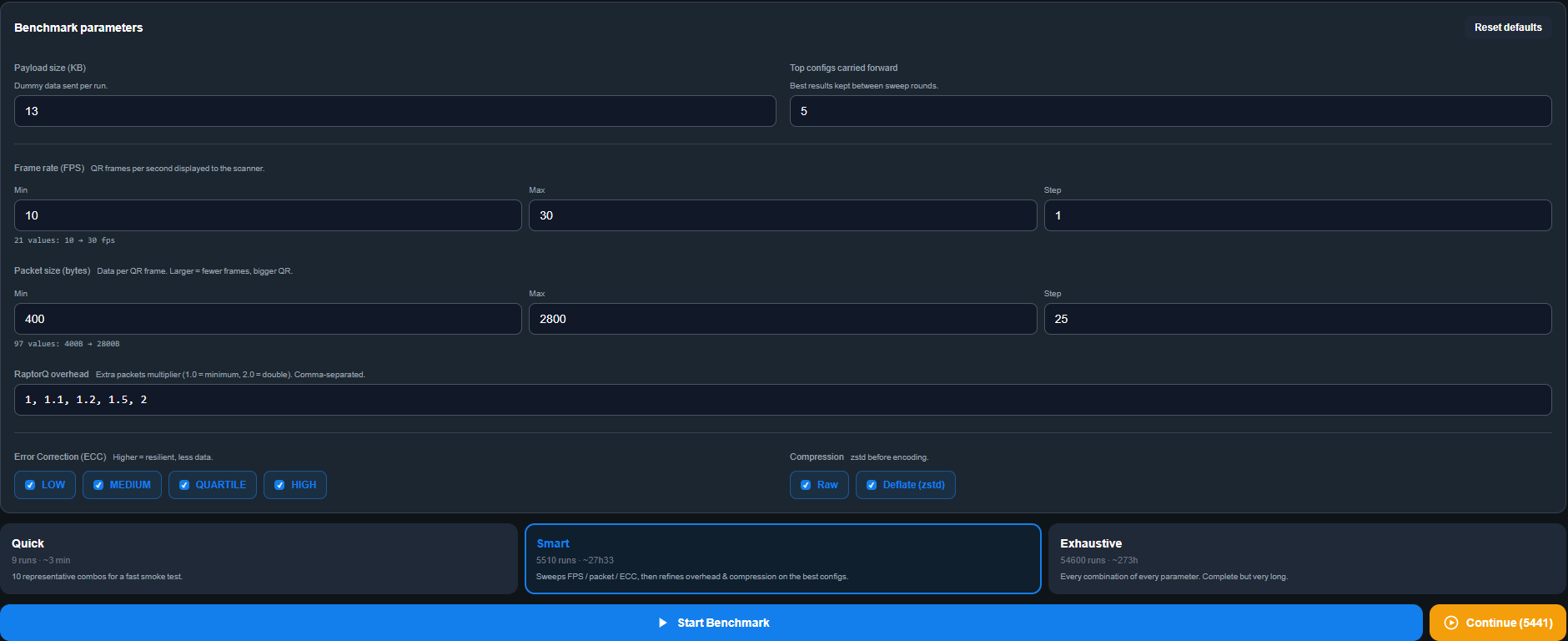
To compare more directly with divan's visualizations, I ran a much denser export than the lightweight smart profile, then analyzed the CSV.
Hardware — 5,560 runs, one screen/camera pair:
- Scanner: iPhone 12, Safari, web scanner in
autoContinue=1mode, rear wide camera, room lighting - Display: 1920×1080 screen
- Payload: 13 KB of random bytes, generated once per session
- Distance: ~20 cm, handheld, clipped by my headset (not an ideal setup, but very usable)
Dataset:
- 10–30 FPS, 400–2,800 B in 25 B steps, 4 ECC levels
- 5,460 phase-1 runs
- 100 phase-3 runs (
overhead × compression)
CSV: docs/blog/assets/benchmark-5560/benchmark-5560.csv
Chart script: docs/blog/assets/benchmark-5560/generate_charts.py
Best runs
Two useful leaderboards: the fastest scan ever observed, and the most reliable config over time.
| Metric | Config | Time | Throughput | GIF size |
|---|---|---|---|---|
| Fastest isolated scan | 12 FPS / 1,175 B / QUARTILE / 1.20× / raw | 0.117 s | 111.1 KB/s | 52 KB |
| Reproducible peak (best phase 3) | 22 FPS / 2,275 B / LOW / 1.10× / raw | 1.59 s (best), 2.14 s (median / 10) | 6.5 KB/s median, 8.17 KB/s peak | 40 KB |
| Best phase-1 median (21 repeats) | 22 FPS / 2,275 B / LOW / 1.20× / raw | 2.73 s median | 4.77 KB/s median, 8.17 KB/s p95 | 40 KB |
Two notes:
- The “fastest isolated scan” is an artifact. 0.117 s = one camera frame. The phone was already pointed at a GIF with K packets buffered from a previous loop; the decoder finished on the first new frame. Reproducible (78, 67, 60, 48 KB/s on other isolated runs of the same config), unusable as a transport.
- The honest peak is ~8 KB/s: for 13 KB, about 2 s of transfer.
Compared to other transports
| Transport | Effective throughput | 13 KB | 100 MB |
|---|---|---|---|
| AirQR | ~8 KB/s | ~2 s | ~3 h 30 |
| NFC | ~50 KB/s | ~260 ms | ~35 min |
| Bluetooth 5 classic | ~250 KB/s | ~50 ms | ~7 min |
| AirDrop (iPhone 12 ↔ Mac, realistic) | ~40 MB/s | < 1 ms | ~2.5 s |
| Wi-Fi 6 | ~150 MB/s | negligible | < 1 s |
Wi-Fi is about 5,000× faster, and even NFC wins. AirQR's point is not speed:
- No pairing (no Bluetooth discovery, no handshake)
- No network (no Wi-Fi, no LAN, no DHCP)
- No permissions (no AirDrop “everyone” prompt, no MDM profile)
- No drivers (no USB, no MTP, no cable)
- No persistence (the data is on screen, never written)
The surface — FPS × packet size × ECC
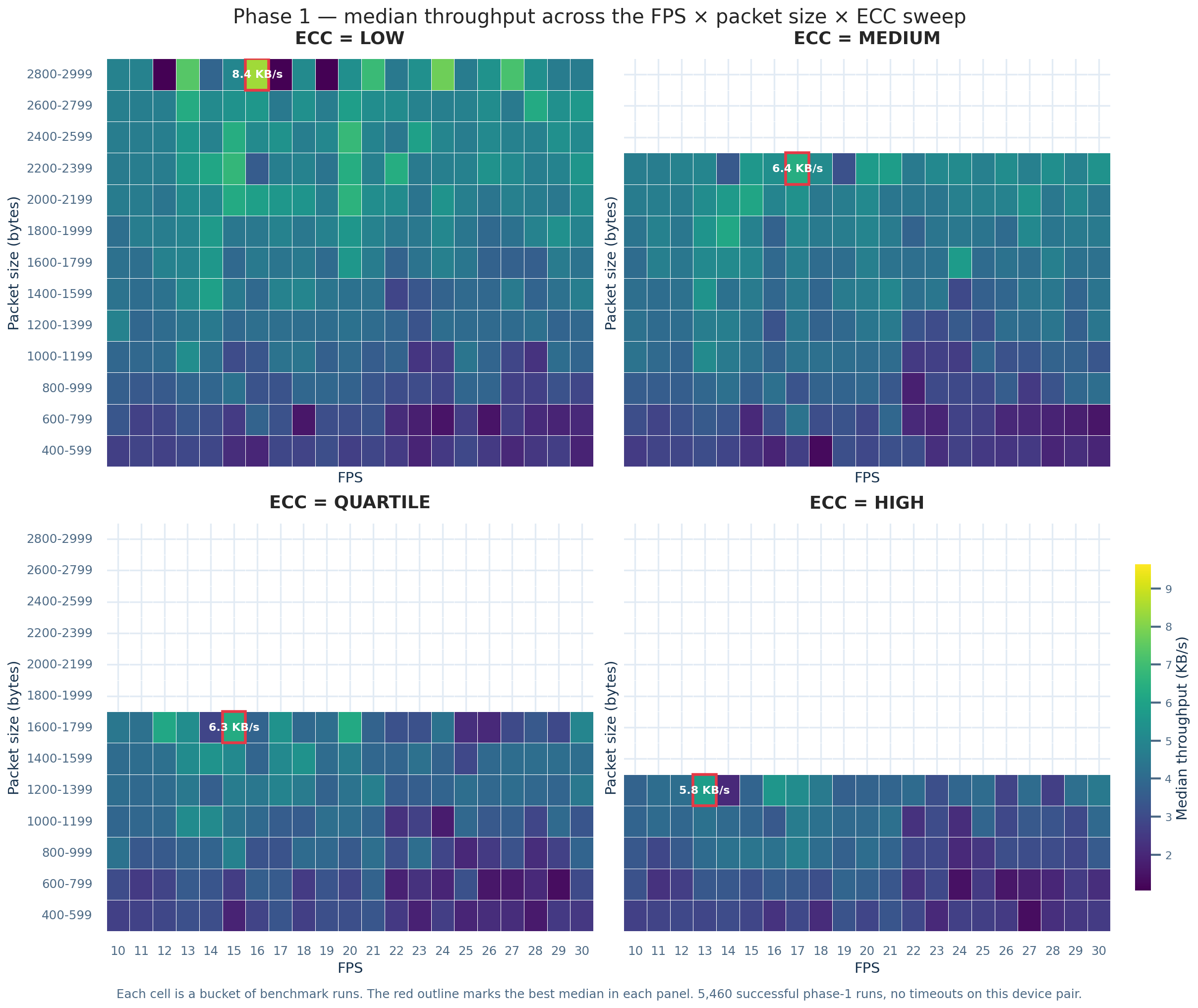
Each cell is the median of a bucket of runs. The four panels share the same grid.
- The fast zone is a plateau, not a point. A band of ~2,000 B packets between ~12 and 20 FPS stays within 10% of the best cell. That is what fountain codes buy you versus a fixed loop.
- ECC removes options.
HIGHcannot fit packets above ~1,300 B: payload + 30% redundancy no longer fits in a version-40 QR. Raising ECC costs twice: larger frames, fewer packets per frame. - Best medians on this pair: LOW @ 2,800 B / ~15 FPS ≈ 8.4 KB/s; MEDIUM tops out around 6.4 KB/s.
Time vs packet size
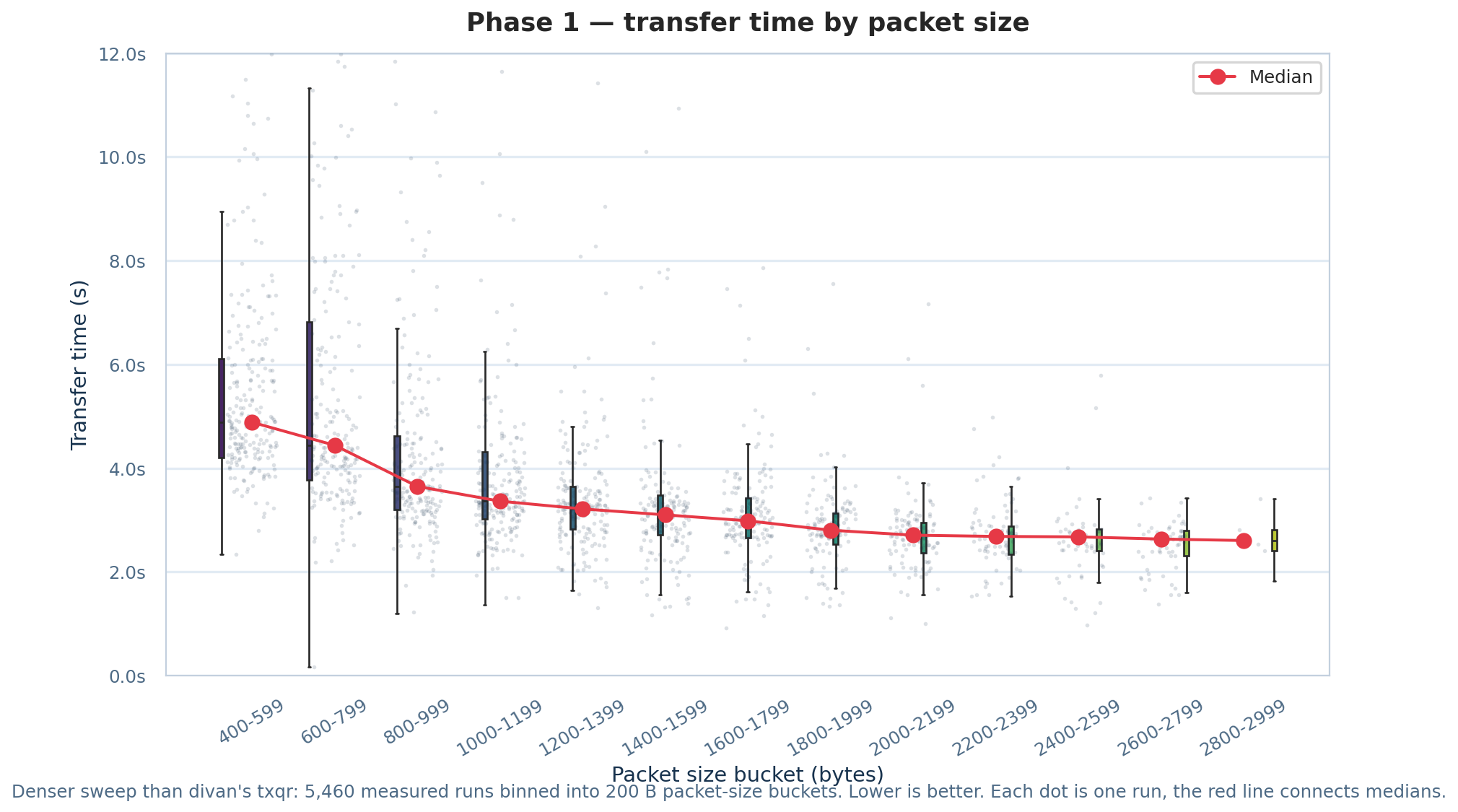
Lower is better. 200 B buckets; scatter for density; red line = medians.
- 400–599 B: median ~4.8 s — mostly header.
- 2,600–2,799 B: median ~2.4 s, almost twice as fast.
- Past ~2,000 B, the gain is modest. If the camera locks 1,800–2,000 B reliably, there is little left to squeeze.
Time vs FPS
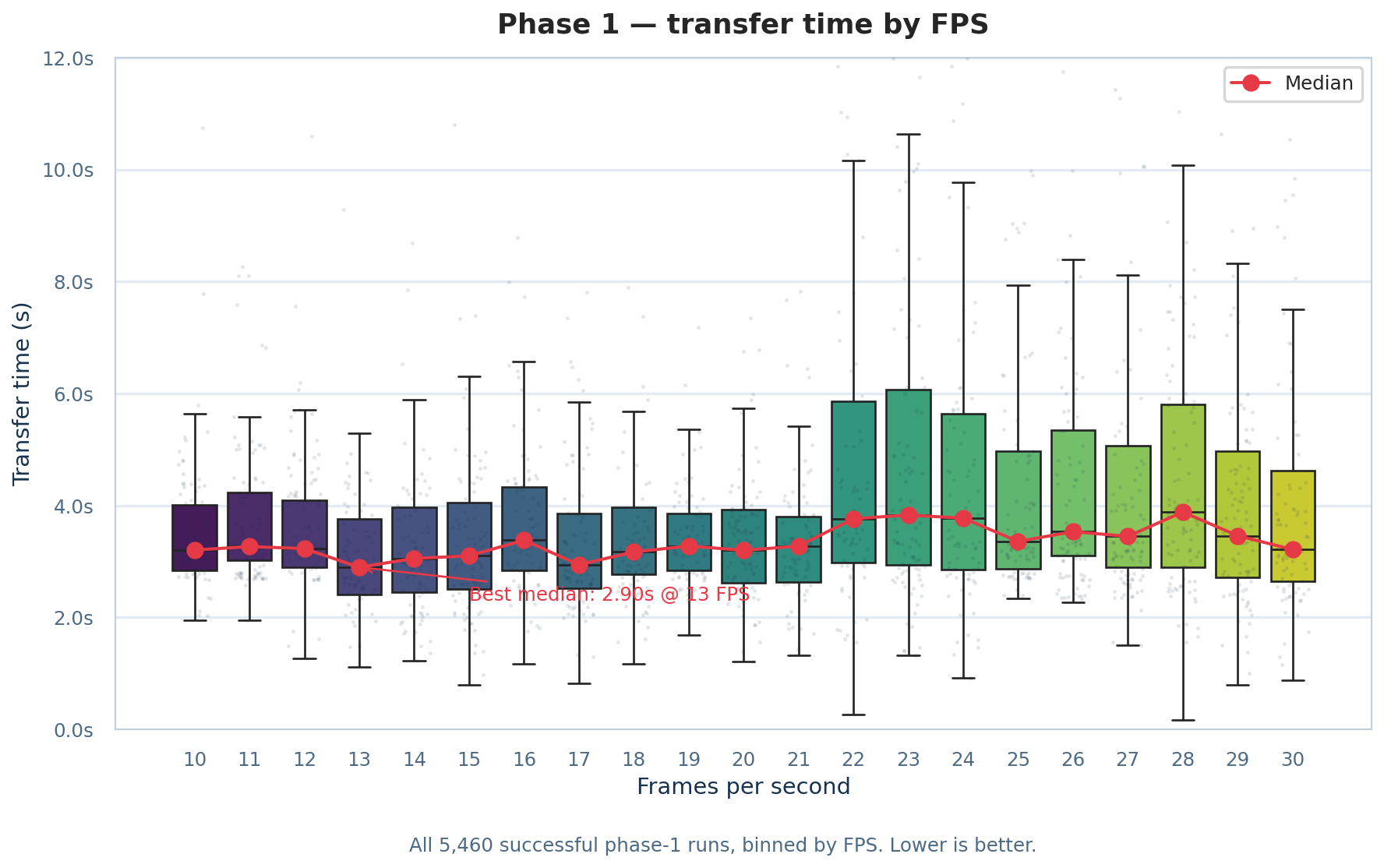
Lower is better.
FPS matters, but less than packet size:
- Best median at 13 FPS ≈ 2.9 s, a wide valley from 10 to 21 FPS under 3.5 s.
- Above 22 FPS, medians hold but the IQR widens 2–3×.
Time vs ECC level
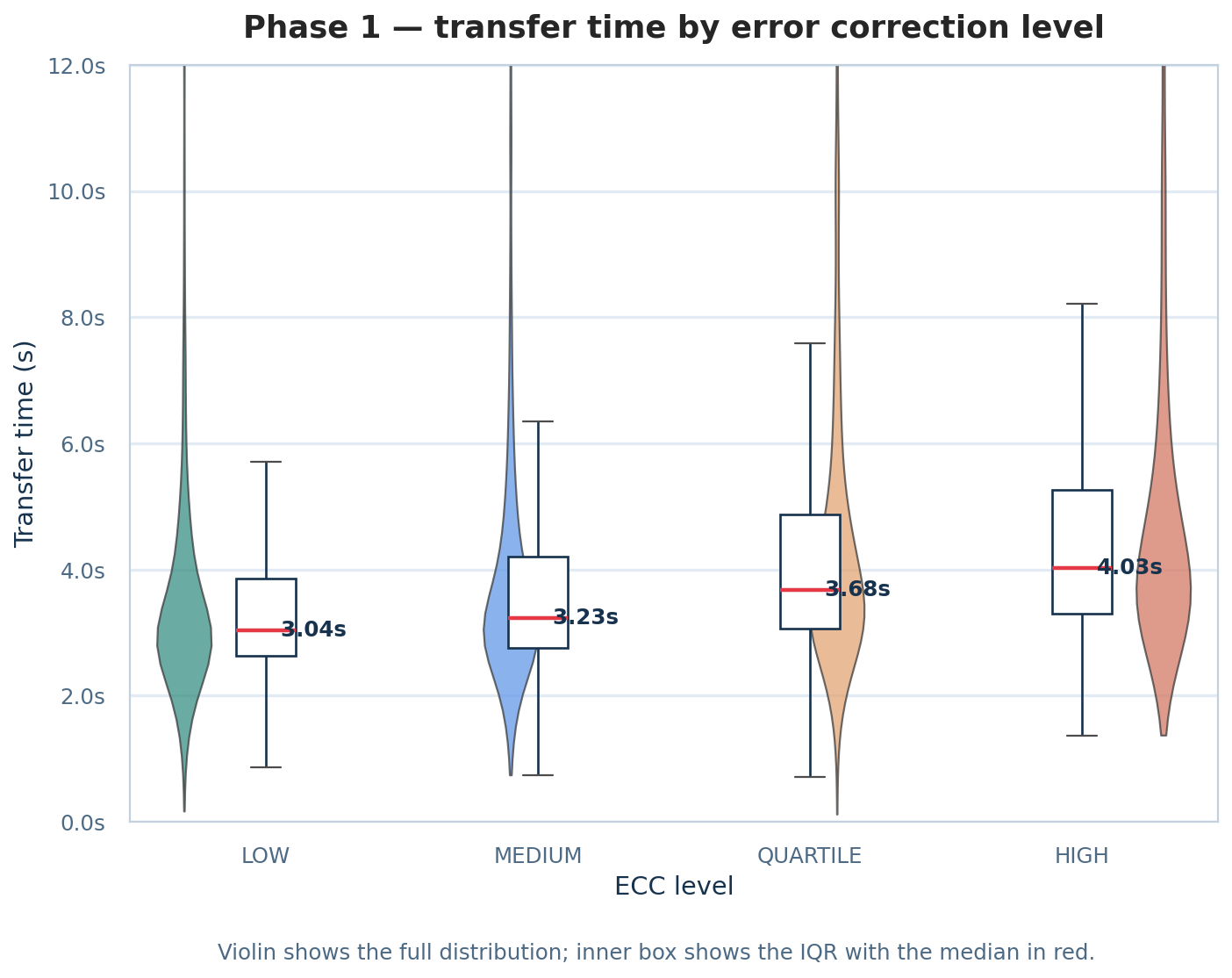
Violin: full distribution (clipped at 12 s); inner box = IQR, median in red.
| ECC | Redundancy | Median | vs LOW |
|---|---|---|---|
| LOW | 7% | 3.04 s | — |
| MEDIUM | 15% | 3.23 s | +6% |
| QUARTILE | 25% | 3.68 s | +21% |
| HIGH | 30% | 4.03 s | +33% |
Low redundancy wins by default on throughput. The twist is in the tails: HIGH is tighter, so the worst case is better if the camera drops frames. Reliability vs speed, measured.
Phase 3 — overhead and compression
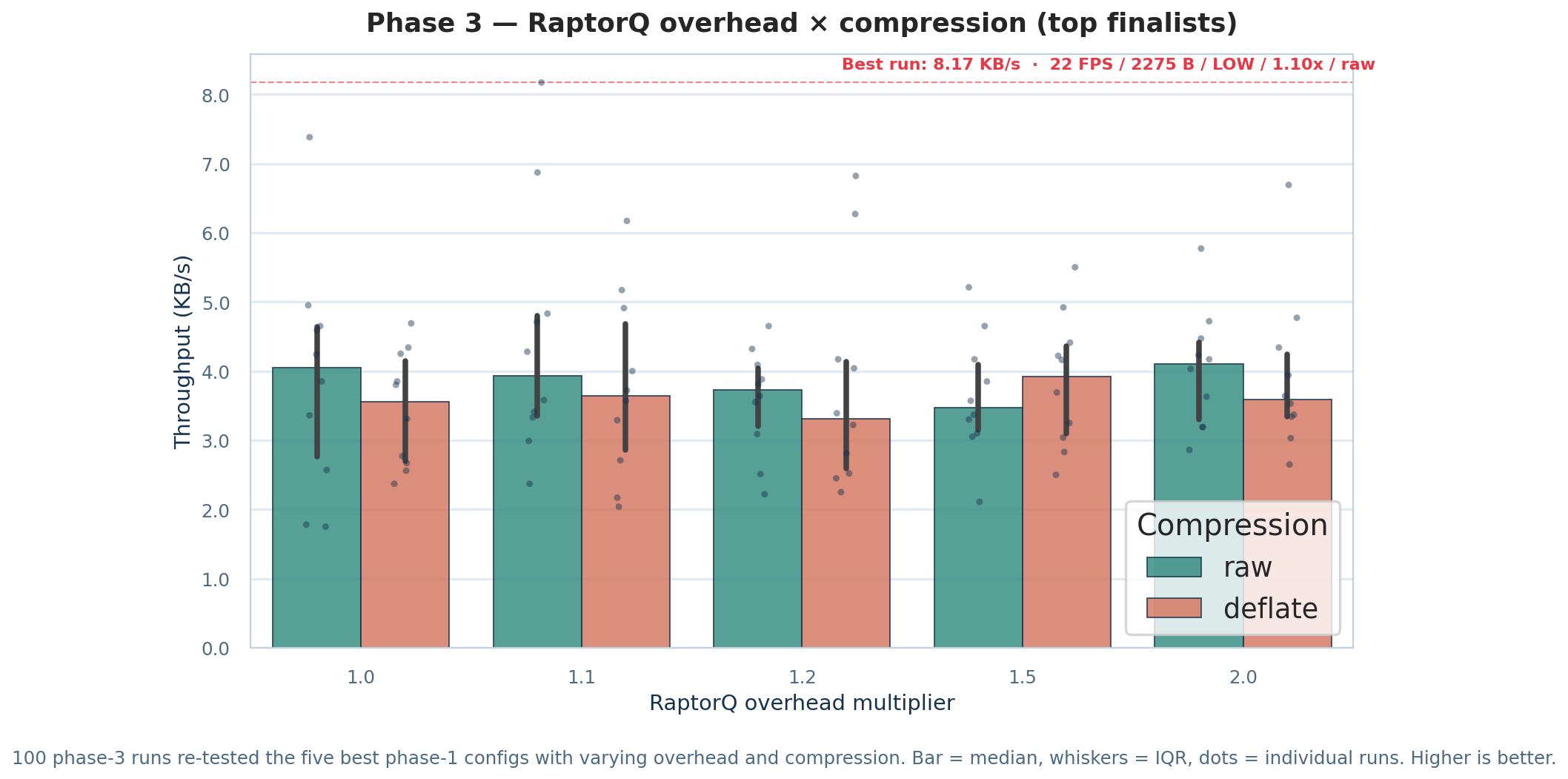
Bar = median over 10 retries, whisker = IQR, dots = individual runs.
- Raw beats deflate in 4 cases out of 5. The payload is 13 KB of random bytes: deflate has almost nothing to compress. Real JSON would often reverse that — hence the “text / JSON” row in the recommended table below.
1.5× / deflatewins its column: high overhead is when compression starts to pay.- Best isolated run:
22 FPS / 2,275 B / LOW / 1.10× / rawat 8.17 KB/s. - For stability over peaks:
1.0× rawand2.0× rawhave the tightest IQRs.
Bonus: size / speed Pareto front
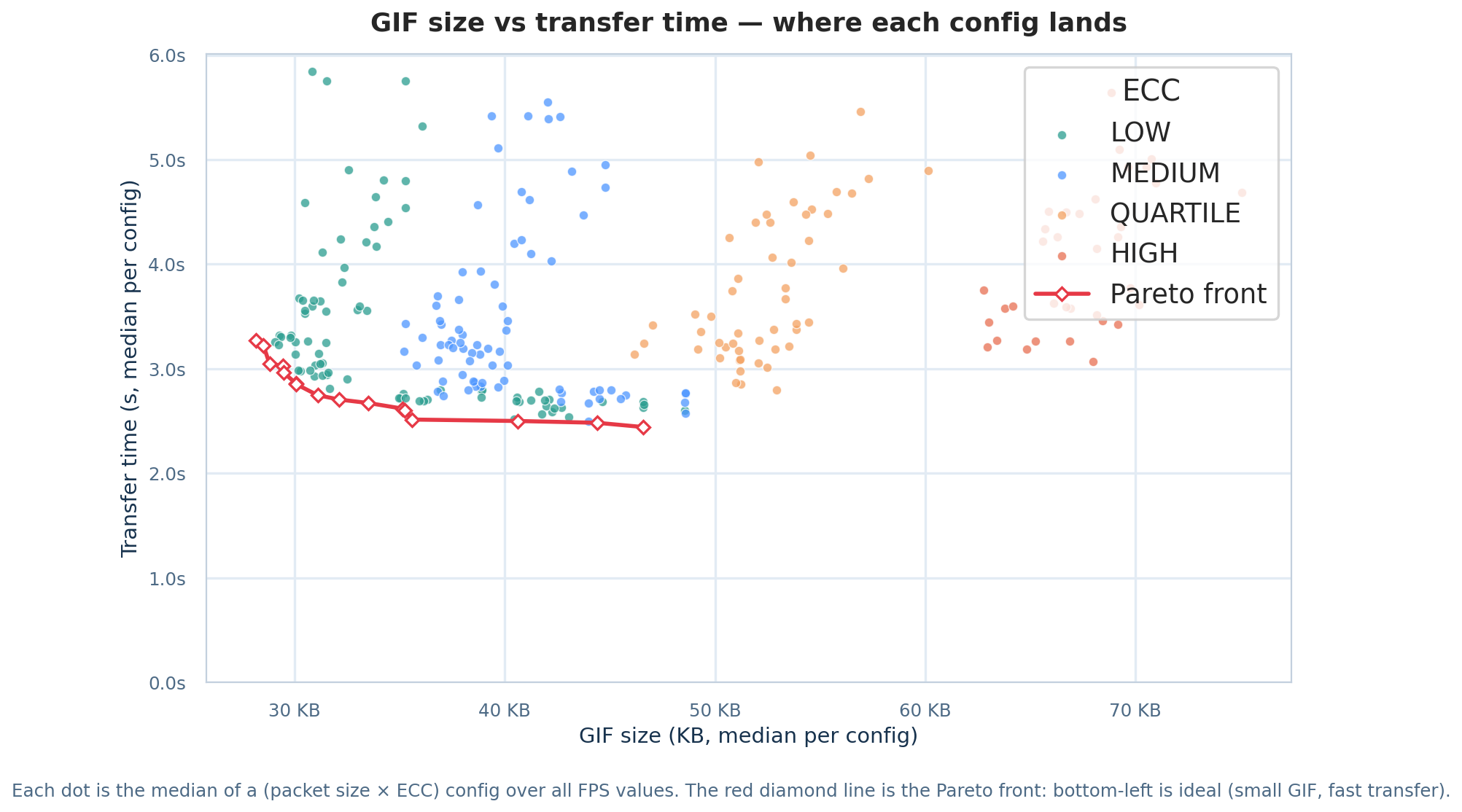
Each point is the median of a (packet size × ECC) config across all frame rates. The red line is the Pareto front.
Practical question: what real time if I want the smallest possible GIF?
- Front from 28 KB / 3.3 s (smallest viable GIF) to 45 KB / 2.4 s (fastest).
- Past ~45 KB, no more gain. QUARTILE and HIGH end up both larger and slower on a cooperative pair.
Bonus: realistic ceiling per FPS
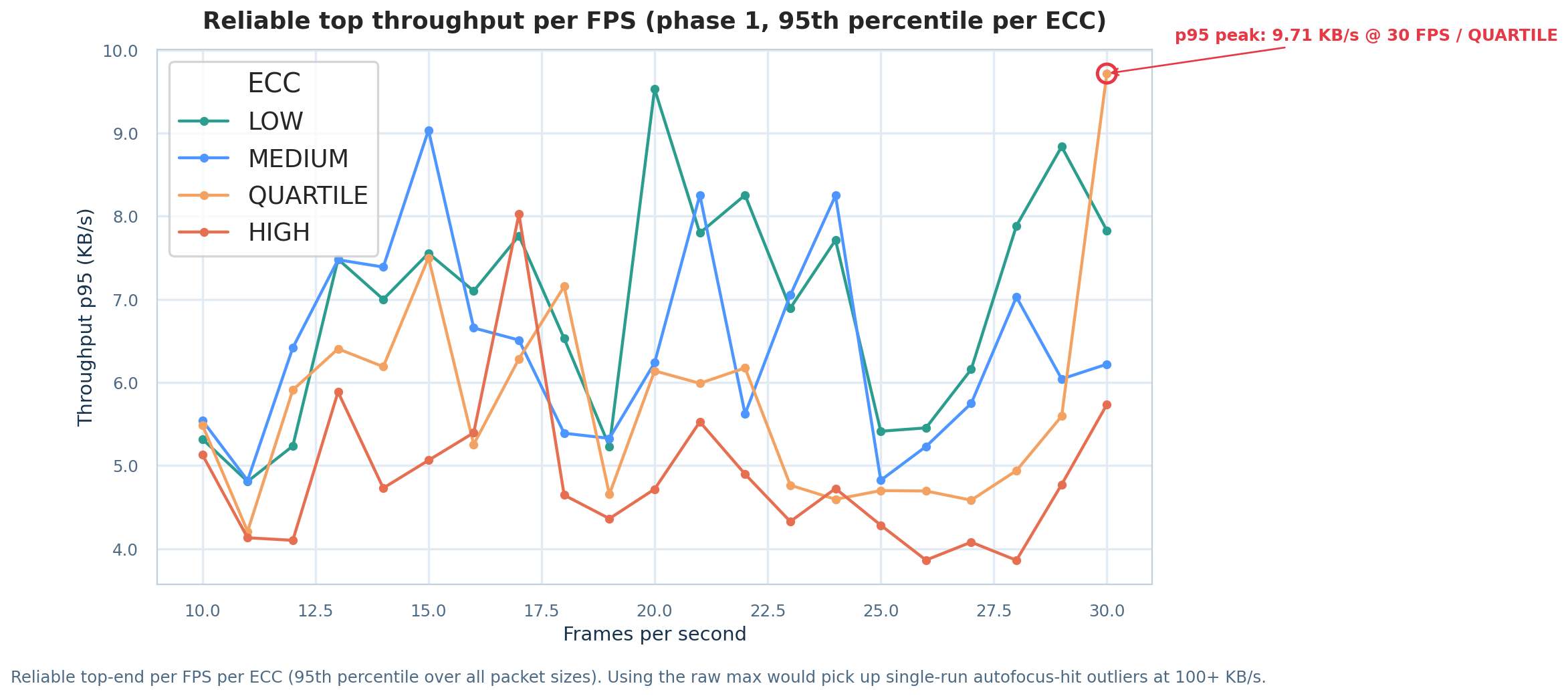
For each FPS: 95th percentile throughput across all packet sizes. Raw max would catch one-shot spikes at 100+ KB/s, not reproducible capacity.
- LOW peaks around 9.7 KB/s at 30 FPS — the hardware ceiling of this pair.
- MEDIUM and QUARTILE trade places depending on frame rate.
- HIGH never exceeds 7 KB/s at p95: a permanent ~25% tax.
Recommended settings (this iPhone 12 / laptop pair)
These numbers do not generalize to another phone or screen — that is why the benchmark ships in the app. On this pair, I would use:
| Use case | FPS | Packet size | ECC | Overhead | Compression | Expected throughput | 13 KB time |
|---|---|---|---|---|---|---|---|
| Fastest | 22 | 2,275 B | LOW | 1.10× | raw | ~6.5 KB/s (median), 8+ KB/s (p95) | ~2.0 s |
| Balanced | 12 | 1,175 B | QUARTILE | 1.00× | raw | ~6.0 KB/s (median), 7.4 KB/s (p95) | ~2.3 s |
| Robust — phone-to-phone, moving | 10 | 875 B | LOW | 1.20× | raw | ~3.4 KB/s (median) | ~3.9 s |
| Text / JSON payload (> 5 KB) | 22 | 2,275 B | LOW | 1.10× | deflate | ~5.0 KB/s (median) | ~2.6 s |
| Max redundancy — dim screen, cheap camera | 10 | 875 B | HIGH | 1.50× | raw | ~2.5 KB/s (median) | ~5.5 s |
Rules that held across the whole sweep:
- Start at
LOW. On a cooperative pair, low ECC wins. Bump to QUARTILE only if the scanner struggles (focus, low light). - Aim for 1,500–2,500 B per packet. Below that you mostly send headers; above that gains flatten and you leave QR capacity except on LOW.
- Stay between 12 and 22 FPS. The whole plateau is usable; beyond that, variance explodes without moving the median. For stability, 12–15 FPS.
- RaptorQ overhead: 1.10–1.20×. Below 1.10× you fail on real packet loss; above 1.20× you pay time for redundancy you rarely need.
1.0×works, but only in perfect conditions.
Try it now







Source is on GitHub:
git clone https://github.com/Thunzyy/AirQR.git
cd AirQR
- Live demo: airqr-demo.pgnrd.fr
- Downloads (Android, Windows, Linux, portable HTML — iPhone coming soon): get-airqr.pgnrd.fr
- Windows: Microsoft Store
- iPhone:
App Store— Coming soon. Use the web demo in Safari in the meantime. - Portable HTML (prebuilt): airqr-portable.html
- Binary releases: AirQR v1.0
- Install guide:
docs/deployment/README.md
Web
cd apps/web && npm ci && npm run dev
# Open https://localhost:5173
Docker
docker compose up -d --build
# Open http://localhost:8081
Portable (zero install)
python build/web_singlefile.py
# Open dist/web-singlefile/airqr-portable.html — a single HTML file
Mermaid diagrams:
- Architecture — entry point
- DIAGRAMS.md — system overview
- ENCODE_DECODE_DIAGRAMS.md — encode / decode
- MAP.md — index of every diagram
What's next
- High-frequency capture: iPhone slow-motion (240 fps) as scanner
- Adaptive FPS: adjust animation speed from real-time scan feedback
- Color QR codes: color channels to multiply density per frame
- WebRTC fallback: when both devices have a network, skip QR
- Better GIF compression: the biggest remaining lever — ideas welcome
Takeaways
-
Fountain codes make animated QR practical. Without them, one missed frame blocks everything. With RaptorQ, any K+ε packets rebuild the data.
-
Optimal settings depend on the hardware. There is no universal “best FPS.” The smart benchmark answers for your screen/camera pair.
-
GIF size is the bottleneck. 1-bit indexing cuts 50–70%, but there is still room. If you have ideas, open an issue.
-
Sometimes the dumbest transport wins. No pairing, no network, no drivers, no permissions. Just a camera pointed at a screen.
Source · MIT License