HDMI Transfer: sending files through video
HDMI Transfer
Turning a file into video frames, then rebuilding it through an HDMI capture card
The idea: use an HDMI video signal to carry file data between two computers. A browser draws changing colored blocks; a capture card turns the video back into frames; a Python receiver reconstructs the file. HDMI Transfer is an experimental prototype, with a standalone HTML sender, a local web interface and Docker startup. Its throughput figures below are calculated ceilings, not hardware benchmarks.
We normally use HDMI to display information for people. But a frame is also a grid of values that another computer can read. If the sender controls that grid and the receiver can recover it, the video path becomes a data channel.
Contents
- The setup
- From bytes to colored blocks
- Why fountain codes help
- Using the application
- Starting with Docker or Python
- How fast can it go?
- Inside the project
- What the POC offers and what remains to test
The setup
The hardware path is straightforward:
Sender PC → HDMI cable → HDMI-to-USB capture card → Receiver PC
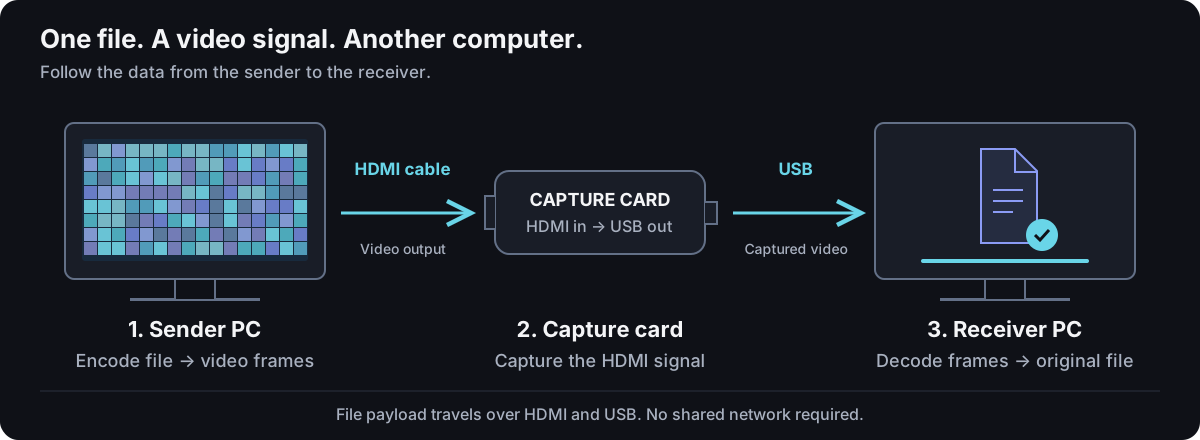 The file payload travels in video frames. The animation illustrates the process; it is not a recording of a transfer.
The sender opens sender.html in a browser and displays the encoded frames on the HDMI output connected to the card. The receiver reads the captured video and decodes it locally.
The capture card matters: the HDMI ports on two ordinary PCs are usually both outputs. Connecting them with a cable does not create a video input. The card supplies that missing input and exposes it to the receiver over USB.
The computers do not need a shared network to carry the file. Prepare the standalone sender and install the receiver first. The receiver's web interface runs locally. You can also serve the sender over a trusted LAN, but that network is then delivering the interface; the transfer payload still goes through HDMI.
From bytes to colored blocks
HDMI Transfer does not display QR codes. It draws a grid of solid colored blocks in a browser canvas. Each block carries values in its red, green and blue channels.
With the recommended 2 bits per channel, each channel has four levels: 0, 85, 170 and 255. Three channels give 6 bits per block. An 8 × 8 pixel block repeats its color over a larger area instead of relying on one isolated pixel.
At 1920 × 1080, that produces a grid of 240 × 135 blocks:
240 × 135 blocks × 3 channels × 2 bits = 194,400 bits
194,400 / 8 = 24,300 bytes per frame
24,300 − 16-byte Fountain header = 24,284 payload bytes
On reception, the software samples the blocks, maps the channel values back to symbols and parses the frame. A CRC helps detect corrupted frame data. Once the file is reconstructed, its SHA-256 metadata supports an integrity check.
The calculation is simple; reliable capture is harder. Scaling, the negotiated video format, color conversion, frame loss and CPU load can all affect decoding. Selecting a higher profile is therefore only one part of the setup.
Why fountain codes help
Suppose a file is split into numbered pieces and every video frame contains one piece. If the receiver misses a frame, it has to wait for that particular piece to arrive again.
Fountain coding gives it more opportunities to recover the data. HDMI Transfer implements LT-style fountain codes, with a robust soliton degree distribution. These are not the RaptorQ implementation used by AirQR.
The encoder splits the data into source chunks. For each encoded packet, a deterministic seed selects a subset of chunks to combine with XOR. The receiver uses the same seed to reconstruct the relationship between that packet and the source chunks.
For a small example:
Received packet 1: A
Received packet 2: A XOR B

Known A XOR (A XOR B) = B
The decoder first resolves simple relationships and propagates the recovered chunks. A bounded Gaussian-elimination fallback can help when that process stalls.
This does not mean any arbitrary set of packets guarantees success. The receiver needs enough useful, valid information, and redundancy consumes bandwidth. It does mean the transfer can tolerate missing frames without depending on every original piece arriving in order.
The project also provides a sequential mode for experiments and comparison. Fountain + Balanced + 2 bpc is the recommended starting configuration in the web interface.
Using the application
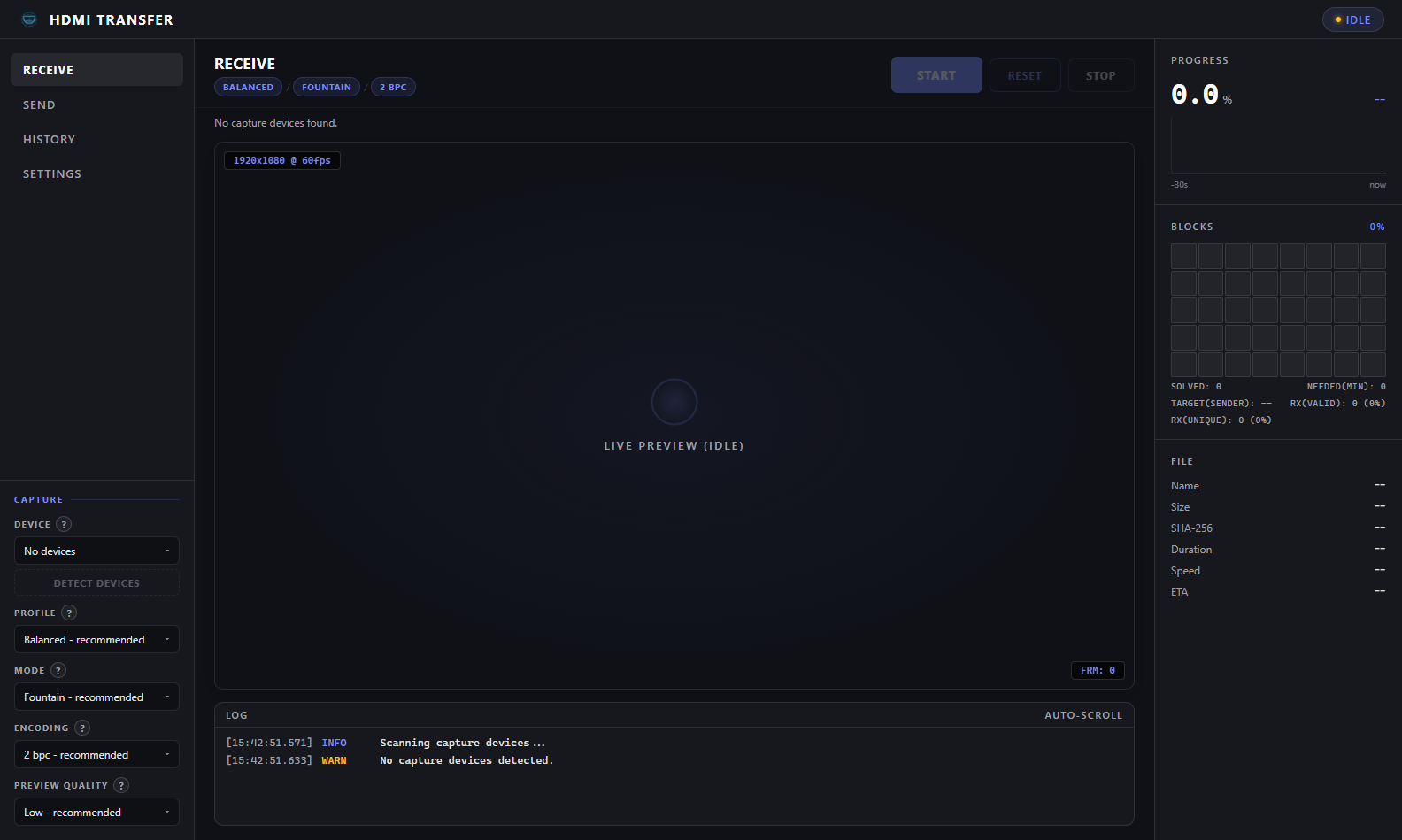 The receiver interface. This screenshot shows an idle session with no capture device exposed.
- Connect the sender's HDMI output to the capture card, then connect the card to the receiver over USB.
- Start the receiver and open its local web interface.
- On the sender, open
sender.html, choose a small test file and move the browser to the HDMI display connected to the card. - Select the capture device and match the protocol, profile and encoding on both sides.
- Start reception, then start transmission in full-screen mode.
- Download the reconstructed file and compare its SHA-256 hash with the original.
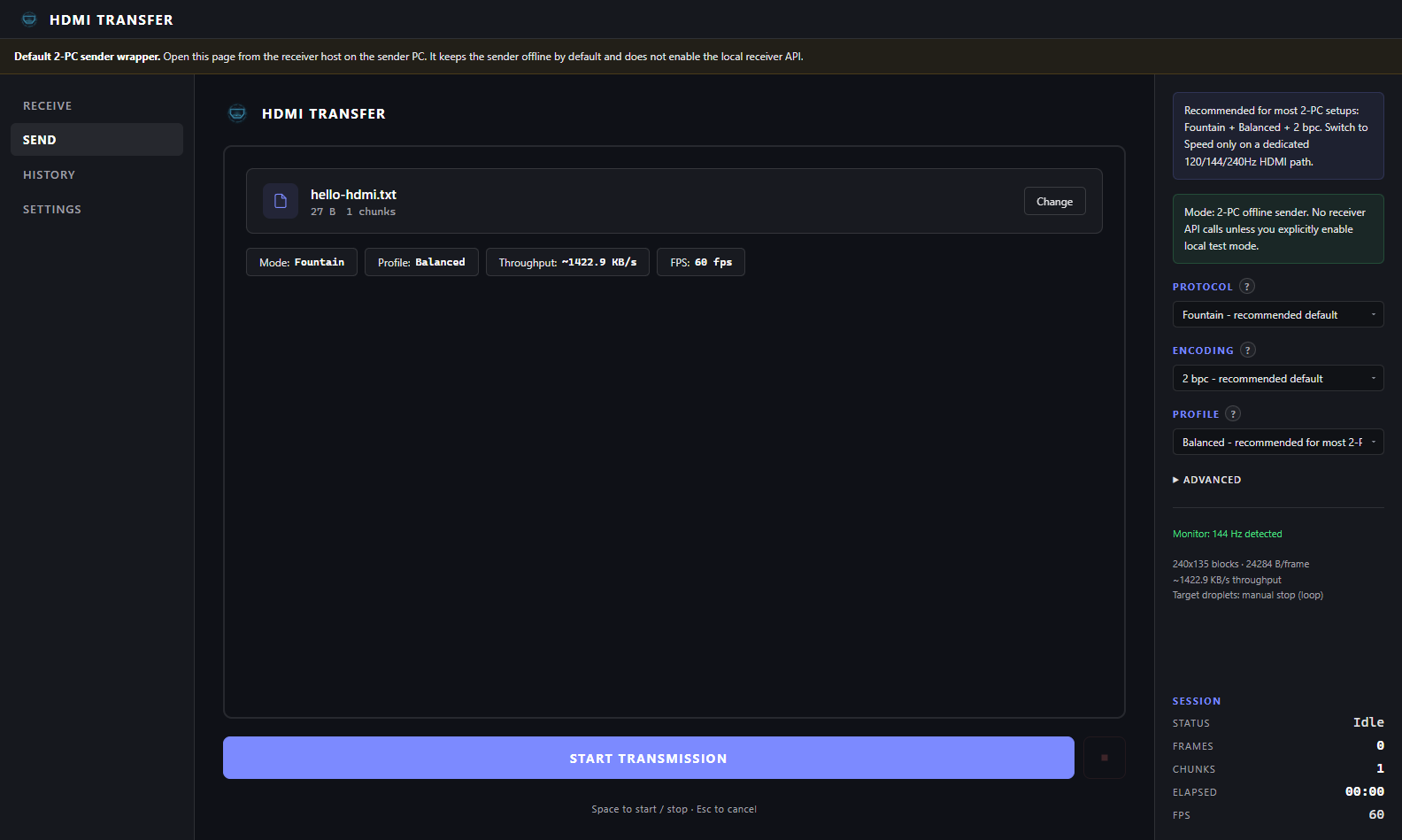 A file ready to send. The screenshot does not show a completed transfer; the displayed throughput is an estimate.
The interface includes transfer history and shared settings. In offline sender mode there is no receiver acknowledgement, so stop the sender when reception is complete. A separate /sender/test page enables explicit local test coordination for a single-PC setup with capture hardware.
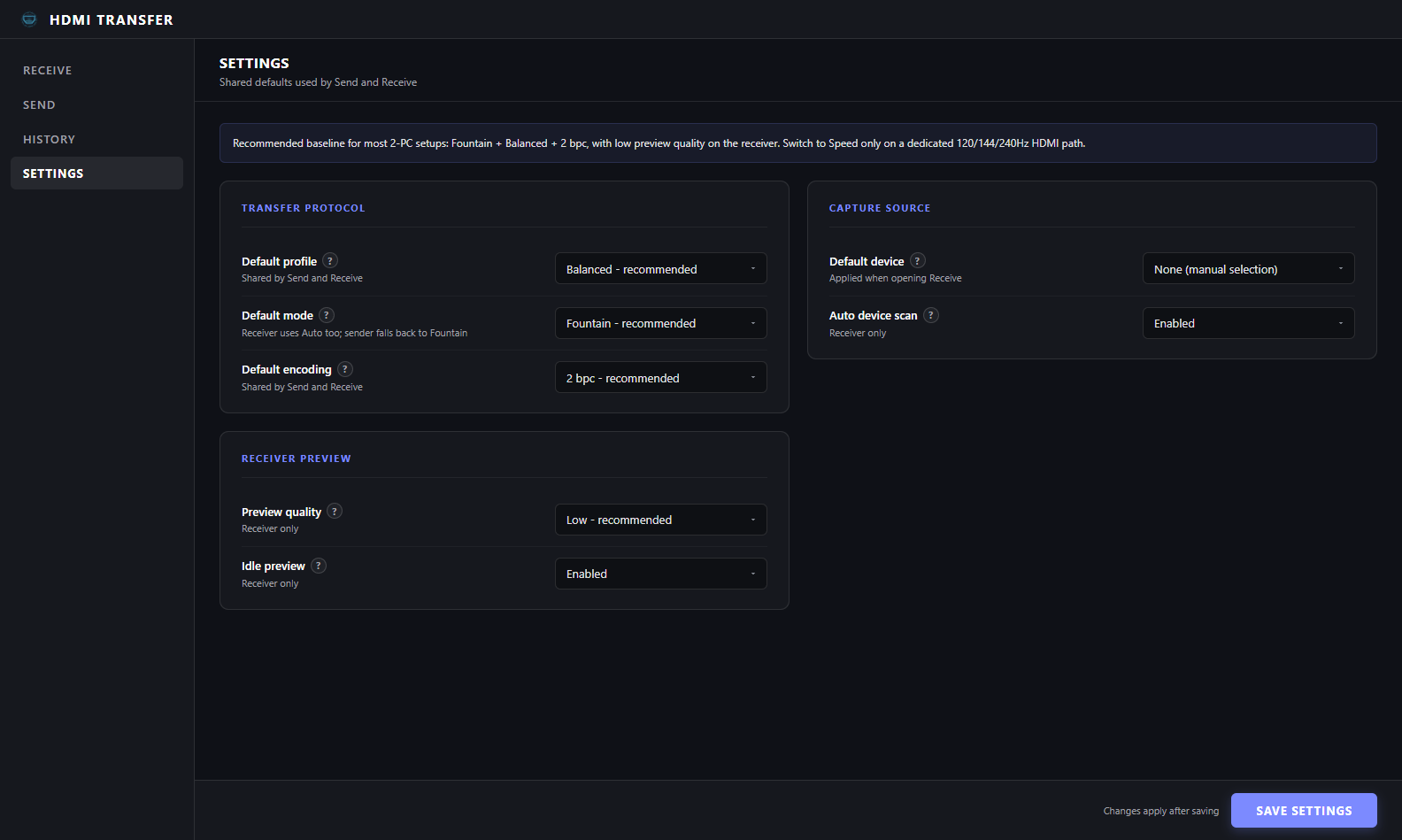 Keep both ends on matching settings before increasing resolution, cadence or encoding density.
Starting with Docker or Python
From a clone of the repository, with Docker running:
docker compose up --build -d --wait
Open http://localhost:5000. Compose waits for the health check, and a named volume keeps received files across container recreation.
Starting the interface does not automatically connect a capture card. Native Linux can pass a video device into the container using compose.capture.yaml. Docker Desktop does not automatically expose a Windows or macOS USB capture card. For native Windows reception, the provided launcher is the simpler starting point:
.\start.bat
On Linux or macOS, use sh start.sh. The native launchers require uv and install the web dependencies. The first installation needs access to dependency downloads. Python 3.11 or later is required.
The sender can remain a local HTML file on the other PC. See the installation guide and hardware setup for the full wiring, device-selection and calibration steps.
How fast can it go?
With Fountain, 8 × 8 pixel blocks and 2 bits per channel, the calculated encoded-payload ceilings are:
| Profile | Resolution / assumed effective FPS | MB/s | Mbps |
|---|---|---|---|
| Balanced | 1920 × 1080 / 60 | 1.46 | 11.66 |
| Speed | 1920 × 1080 / 240 | 5.83 | 46.63 |
| Quality | 3840 × 2160 / 30 | 2.92 | 23.32 |
Here, MB/s means a million bytes per second; Mbps means a million bits per second. The 16-byte frame header is already deducted. Fountain redundancy, lost frames, startup and reconstruction time are not.
These numbers describe capacity under stated assumptions. They are not measured file-copy speeds. The browser limits transmission to the detected display refresh rate. A 60 Hz path cannot deliver 240 different frames per second simply because the Speed profile is selected; at 60 FPS, its calculated ceiling matches Balanced.
A useful hardware benchmark transfers a known file, verifies the result and records the full elapsed time, along with the capture card, resolution, frame rate and encoding. That is the evidence needed before promising a sustained transfer rate.
Inside the project
The sender is HTML and JavaScript, with a canvas used for rendering. The receiver uses Python, OpenCV for video capture, NumPy and Numba for data processing, and Flask for the local interface. The Docker image serves the application through Waitress.
The protocol manifest keeps shared profiles and header definitions consistent. Browser assets are generated from the project sources so the standalone sender follows the same contract as the receiver.
The repository separates protocol code, transfer sessions, capture adapters and interfaces. Tests cover encoding/decoding, browser/Python agreement, receiver behavior and performance budgets. A Docker smoke test checks startup, web endpoints, downloads and persistence. Those software checks are useful evidence about the application, while a physical HDMI transfer remains a separate validation step.
What the POC offers and what remains to test
HDMI Transfer makes the bytes-to-video-to-bytes pipeline concrete: a standalone sender, a capture-backed receiver, loss-tolerant encoding and a usable local interface.
It remains a POC, not a promise that every GPU, adapter, USB port and capture format will work together. The screenshots in this article are real application captures, but they show an idle receiver and prepared sender rather than a successful hardware benchmark.
Encoding is also not encryption. CRC and SHA-256 help check integrity; they do not make a visible video signal confidential. Encrypt a file beforehand when confidentiality is required.
The code is available on GitHub.